> For the complete documentation index, see [llms.txt](https://globosoftware.gitbook.io/globosoftware-docs/llms.txt). Markdown versions of documentation pages are available by appending `.md` to page URLs; this page is available as [Markdown](https://globosoftware.gitbook.io/globosoftware-docs/getting-started/quickstart/publish-the-form.md).
# Publish the form to a page
Put the form on a page of your online store using the Publish window.
{% stepper %}
{% step %}
### Open the Publish window
Open the form in the app > click **Publish** button
{% endstep %}
{% step %}
### Pick a display style
* Choose **Default**, **Boxed**, **Float** or **Popup**
* Optionally tick **Automatically match form style with your theme**
* Click **Next**
{% endstep %}
{% step %}
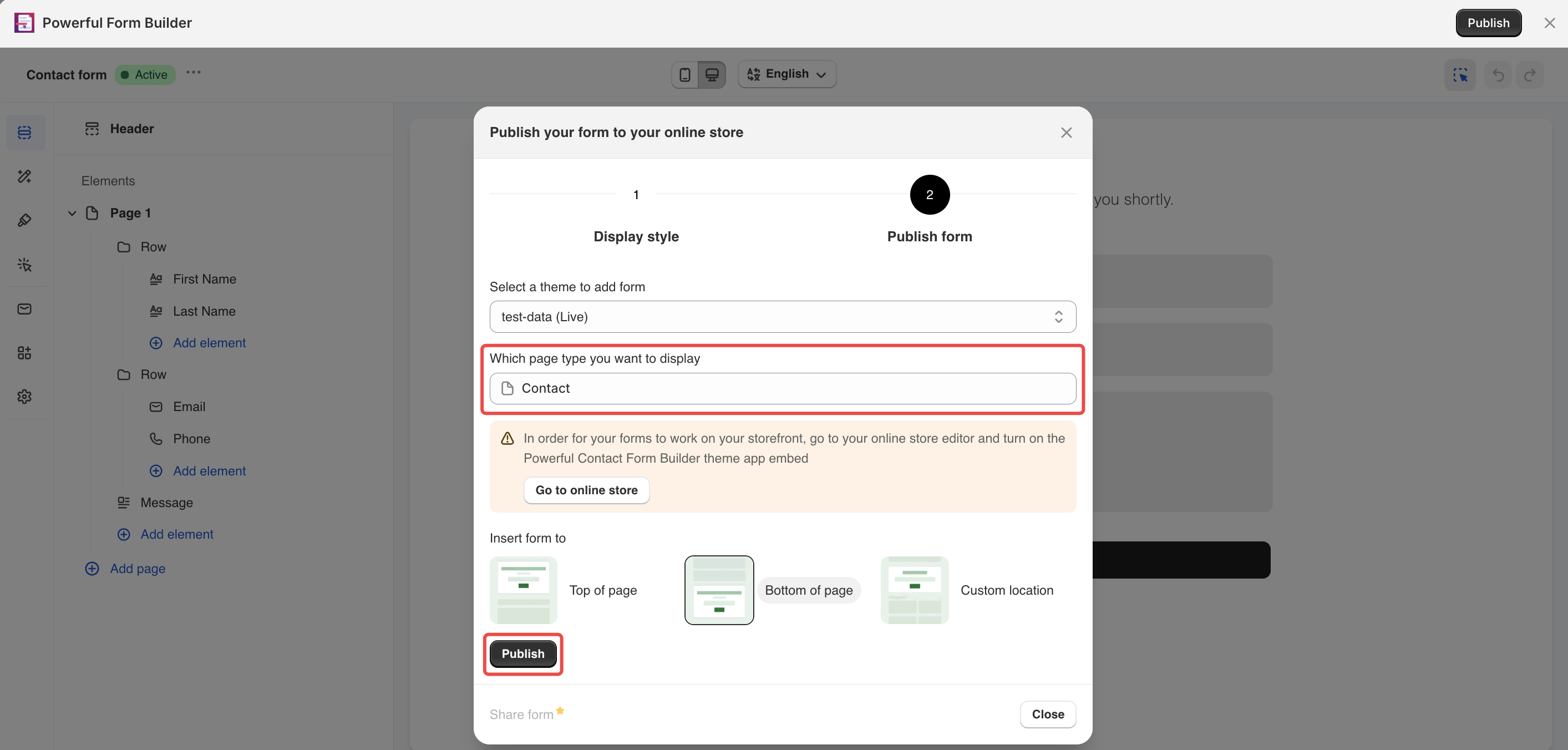
### Choose the theme and the page
* Under **Select a theme to add form**, leave your live theme selected
* Open **Which page type you want to display**, choose **Pages**, then pick a page
* Under **Insert form to**, choose **Top of page** or **Bottom of page**
{% endstep %}
{% step %}
### Click Publish
The button changes to **Published**. To remove the form later, come back and click **Unpublish**.
{% hint style="info" %}
**Home page**, **All product pages**, **Customer register page** and **Cart page** cannot be published automatically here.
Choose **Custom location**, copy the short code, and paste it into the app's **Form** block. See [Add a form with the app block](/globosoftware-docs/display-and-placement/app-block.md).
{% endhint %}
{% endstep %}
{% endstepper %}
## Next steps
* [Turn on the app embed](/globosoftware-docs/getting-started/quickstart/turn-on-the-app-embed.md) — step 3 of the quickstart.
* [Publish your form](/globosoftware-docs/display-and-placement/display-and-placement.md) — every option in the Publish window.